Integration guide
This section describes the integration with the most common variants. Adtelligence will provide you with technical advice and support for integration in your specific IT environment.
Provision of SFTP share
The SFTP share used for data exchange can be provided either by you or by Adtelligence. If possible, authentication should be carried out using public/private key procedures. If the SFTP is provided by Adtelligence, we therefore need a public key from you for authentication. We will be happy to help you create the key.
Provision of data from the data warehouse
The relevant customer data is exported from the data warehouse. This includes the customer’s contact data required for the delivery channels (surname, first name, email address, telephone number, etc.) and other characteristics (which product they own, credit card transactions, age, gender, place of residence, etc.). These must be pseudonymized and transmitted to Adtelligence.
The individual work steps are
1. Creating the data warehouse reports to generate an export file in CSV format.
2. Setting up time-controlled automation so that the export files are generated regularly (daily).
3. Setting up the data splitter. The data splitter is a component that reads the export files and separates the customer-identifying (contact) data from the other data.
The data splitter creates two new separate files from the data warehouse export. Each data record is given a newly generated unique ID in the two files, which can later be used to merge the data again. This is referred to as “pseudonymization of the data”.
The data splitter is provided by Adtelligence as a script adapted to your data format in the Python programming language. Alternatively, you can implement this pseudonymization function yourself.
In any case, the data splitter must be part of your infrastructure so that the pseudonymization takes place before the data is transferred to Adtelligence. The data splitter must also be called automatically on a time-controlled basis. For this purpose Windows systems, a cron job can be set up for Unix/Linux systems.
4. The file generated by the data splitter, which contains the non-customer-identifying data, is transferred to Adtelligence. If the Python script supplied by Adtelligence is used as the data splitter, the storage on an SFTP server can also be carried out directly from this script. Otherwise, the transfer via SFTP can also be automated using the Windows scheduler or a cron job.
Resolving pseudonymization and triggering actions (e.g. sending emails)
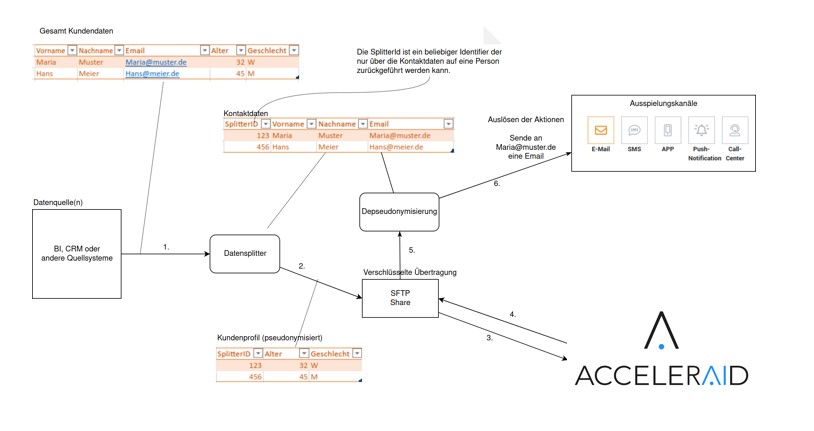
After Adtelligence has selected the target groups and assigned the respective action, the pseudonymization must be resolved again before the action is triggered. The second file generated by the data splitter (with the contact data) is used for this purpose. There are two fundamentally different options here. The resolution can be carried out by you or directly in the delivery channel (e.g. email provider).
Option 1:
Resolving the pseudonymization at your end
For this purpose, a Python script adapted to your environment can be supplied by Adtelligence in the same way as the data splitter. Alternatively, you can implement the steps described below yourself (with support from Adtelligence, if required). The steps in detail:
1. Fetching the target group file provided by Adtelligence (in CSV format) from the SFTP server.
2. Resolving the pseudonymized ID in the target group file using the second file generated by the data splitter with the contact data. This results in the list of customers to be contacted required by the delivery channel (e.g. e-mail provider).
3. Transfer of the list to the delivery channel. This depends on the delivery channel, in most cases this is also done via an SFTP upload.
4. Setting up the time control. This can also be done via the Windows scheduler or via a cron job on Unix/Linux systems.
Option 2:
Resolution of pseudonymization in the playout channel
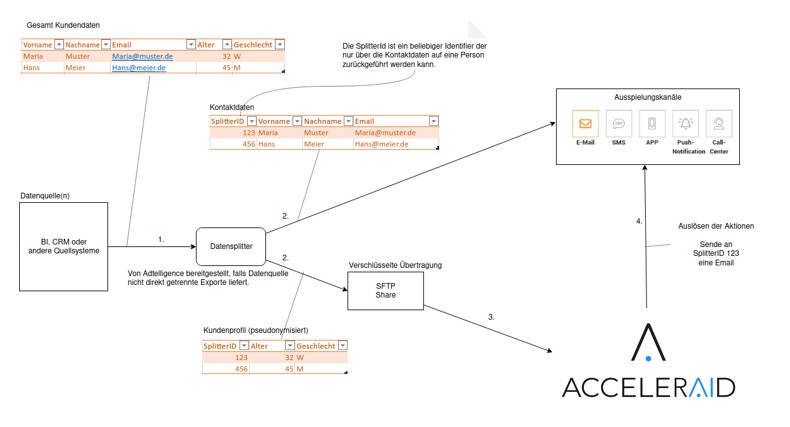
If the playout channel (e.g. email provider) supports playout from a predefined contact list via an ID, the ID resolution can also take place directly in the playout channel. In this case, you only need to transfer the file generated by the data splitter with the contact data of all customers who can be contacted to the playout channel. This can usually be done with an SFTP upload and provided as a functionality in the Adtelligence data splitter.
Return e-mail dispatch and opening confirmation
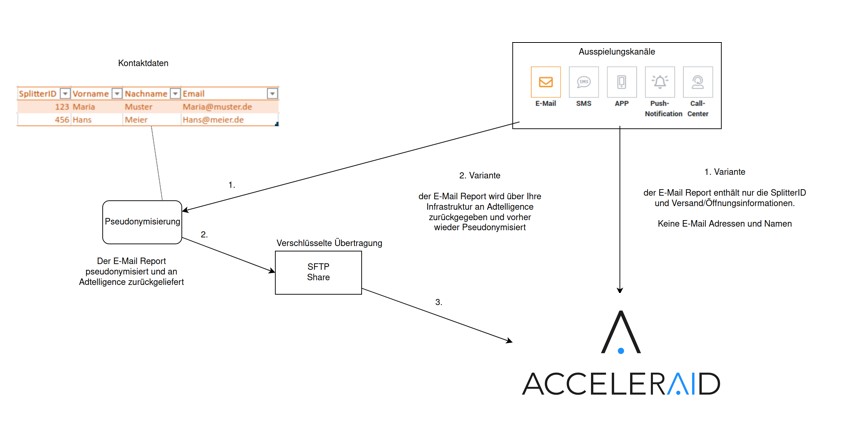
The report on which emails were successfully sent and opened by the recipient should flow back to Adtelligence from the email provider. As with sending, you have the option of transmitting this report directly – but it may then only contain the pseudonymized IDs – or of interposing a pseudonymization of the report on your side.
Option 2: Resolution of pseudonymization in the delivery channel
If the delivery channel (e.g. email provider) supports delivery from a predefined contact list via an ID, the ID resolution can also take place directly in the delivery channel. In this case, you only need to transfer the file generated by the data splitter with the contact data of all customers who can be contacted to the delivery channel. This can usually be done with an SFTP upload and provided as a functionality in the Adtelligence data splitter.
Return e-mail dispatch and opening confirmation
The report on which emails were successfully sent and opened by the recipient should flow back to Adtelligence from the email provider. As with sending, you have the option of transmitting this report directly – but it may then only contain the pseudonymized IDs – or of interposing a pseudonymization of the report on your side.

Frequently asked questions
How is the software provided?
The software is made available via the internet as a cloud solution; alternatively, an on-premise installation can also be implemented on request. However, this does not require any personal data to be transferred to the cloud. We have developed a special pseudonymization procedure for this purpose.
What data is required?
General customer characteristics such as age and gender, information on their card products and transactions are used. If available, further data, such as contact history, can be integrated. More detailed information about the data fields can be found in the separate document on data fields.
An excerpt can be found here: https://knowledgebase.acceleraid.ai/docs/first-steps/cdp-prediction-engine/data-description-for-data-import/
How does the data get into the software?
The most common way is a CSV data export from the BI system, the CRM or from the credit card processor. A fully automated daily statement with the necessary data should be exported. If your system does not have a corresponding built-in export function, we will be happy to support you with automation. However, we can of course also integrate other interfaces. The transfer to the Adtelligence Cloud is encrypted via SFTP (Secure File Transfer Protocol). Alternatively, other interfaces (e.g. cloud shares) can also be used for integration.
Why can Adtelligence work without personal data?
The Adtelligence software can work with an anonymous identifier and does not require any personal data or credit card or account numbers. For this purpose, a data splitter is interposed in the export, which pseudonymizes and filters the data. The data flow is shown in the graphics in the rest of this document. Adtelligence never has access to the personal data, but can still trigger the appropriate email. The data splitter separates the personal and contact information relevant to the delivery channels from the rest of the data set. From the remaining data, the fields that are required for suitable customer approaches are selected and transferred to Adtelligence. Data fields that are neither relevant for delivery channels nor for decision-making, such as credit card or account numbers, are discarded by the data splitter if available. For subsequent assignment in the delivery, an identifier is attached to each of the two data records, which cannot be traced back to a person without the data of the delivery channel.