1. Customer Experience Management Software
The Adtelligence Customer Experience Management software automatically analyzes the information of each website visitor in order to dynamically play out website variants optimized for this visitor in real time and thus increase conversion rates. To do this, it is integrated once into your content management system (CMS) and then runs seamlessly and fully automatically.
Each visitor is shown the version of your online presence that suits him or her best. The integrated machine-learning algorithms anticipate the needs of each user and learn from them for the future. In this way, the software determines for each visitor individually the version that offers the highest conversion probability and thus increases the purchase and completion rates of your website fully automatically.
The details of the CMS integration depend on the customer’s setup and business case and can be specifically adapted to your needs at any time. There are two types of integration available for CMS integration: client-side JavaScript integration and server-side full integration. These are explained later in the document.
For more information on the Adtelligence Customer Experience Management Software, click here: https://adtelligence.com/en/conversion-increase-through-personalization/
2. Optional Integrations for your CMS
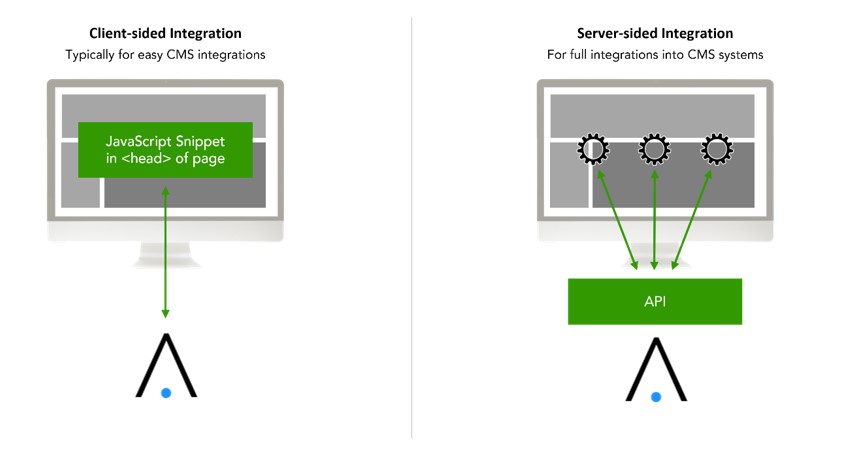
Depending on IT/business requirements, integration into a CMS can be implemented flexibly.
From a purely client-side integration via JavaScript snippet to server-side CMS integration with/without proxy, different integration scenarios can be implemented. To determine the best type of integration for you, the following questions are relevant:
1. Content creation: who develops the content of the personalized variants?
a. Content is developed by Adtelligence
b. Content is developed by customer
2. Content management: Where is the content of the personalized variants hosted?
a. Content is hosted and played out by Adtelligence
b. Content is developed by Adtelligence and provided in a VCS (Version Control System, e.g. git repository), from there it is played out by the CMS.
c. Content is hosted in and played out from the CMS.
3. Are there any technical requirements that are not provided by the CMS (e.g. connection of specific external APIs, uploading content to a SFTP…)
a. Yes: a proxy can be used as a gateway providing individual business logic
b. No: a proxy is not necessary
3. Integration of Customer Experience Management via JavaScript
The integration of Adtelligence Customer Experience Management (CX) into a CMS using JavaScript enables the simple creation of variants of existing web pages as well as the tracking of visitor actions, without a deeper integration into the CMS. Adtelligence provides the JavaScript snippet, which is integrated via copy&paste into the <head> area of all web pages on which variants are to be played out or a pageload or success is to be tracked.
Essential for the correct functioning of the technology is the integration of the snippet in the <head> of those pages on which content is played out.
3.1 JavaScript Integration – Data Flow
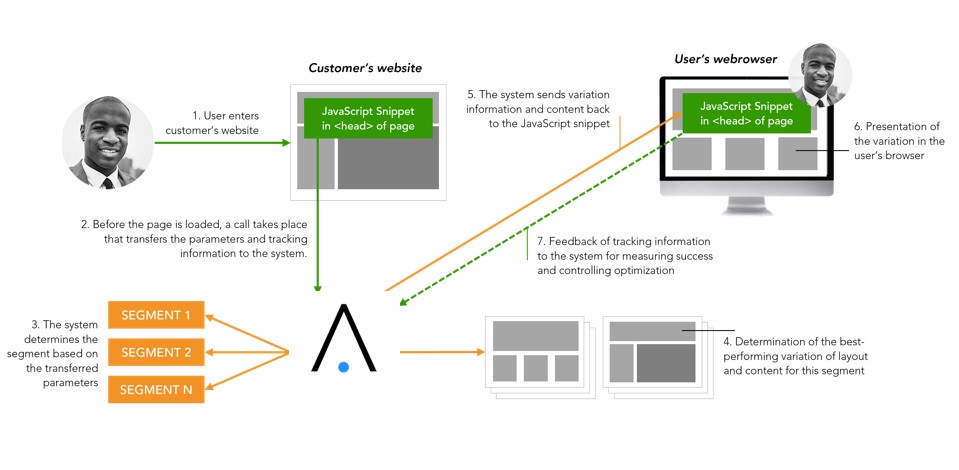
Data flow schema
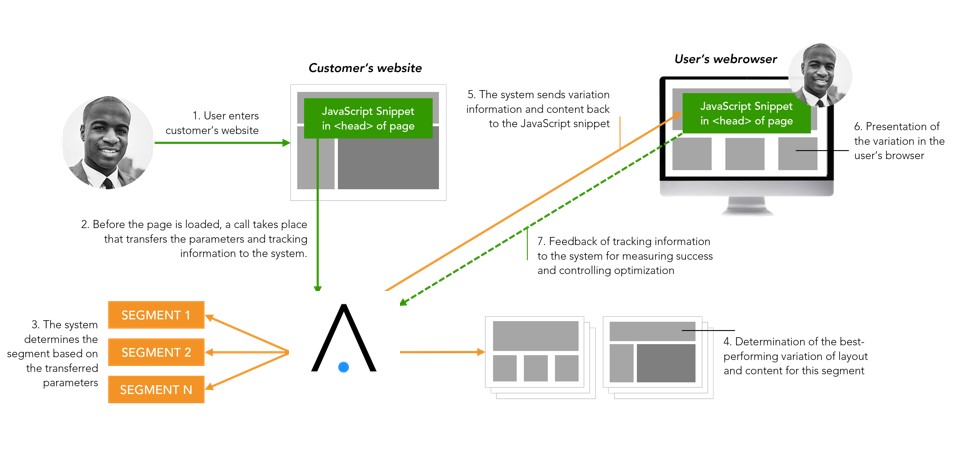
- A user enters the web page.
- Even before the page loads, the JavaScript snippet interacts with Adtelligence CX and transmits the data to be collected (see below).
- CX then calculates the user segment and the page variation to display for that user and plays it back in a JSON. The JSON is processed by the JavaScript snippet and the page variation is displayed to the visitor. This communication takes place within a few milliseconds, so there is no degradation of the user experience for the visitor. Flickering of the web page is suppressed.
- When jointly defined goals are reached (e.g., clicking on a button, reaching the order confirmation page, etc.), the successful action is reported to CX via a tracking call to measure which variations lead to the goal for which target groups. Here, an anonymous ID of the achieved goal is transmitted, which does not contain any personal data.
Tracked data
Adtelligence CX tracks the following types of data by default:
- Random visitor ID
- Date and time of visit
- Web browser
- User Agent
- Visited web pages
- Approximated geolocation
- IP address anonymized to the first two octets
Additional tracking data
In addition to the aforementioned data, cookies (1st-party cookies) or data from marketing campaigns can be used, for example, which are transferred via URL parameters. Only very limited and usually non-personal information is transferred from the respective marketing channels or advertising media, e.g. the keyword entered in Google AdWords, the ID of an affiliate partner or a campaign name.
The Adtelligence customer determines which further data he provides for use. The system does not work with personal data unless such data is explicitly transmitted by the Adtelligence Customer, e.g. by providing data from third-party systems or the CRM. In this case, an order processing agreement is concluded which regulates the processing of personal data.
Adtelligence operates in strict compliance with data protection regulations. Data storage is pseudonymized, i.e. a user is assigned a random user ID as a hash. Likewise, a user is assigned to a target group with a target group ID within individual projects. The data sent to CX is freely available data as well as data provided by the Adtelligence customer (see above). As a rule, these are not personal data. Should the Adtelligence customer decide to use personal data, this data can be anonymized before transmission. This is already done today with the IP address, which is masked to 2 bytes before use (ex: 123.234.178.012 becomes 123.234.000.000) and is not fully processed or stored.
3.2 Load Times and Render-Blocking
The following behavior is optional and configurable. It only takes effect in a delivery case, but not on a page that is only to be tracked.
As soon as the two integration scripts are loaded (usually after < 50ms), the page is briefly hidden to prevent the web page from flickering. As soon as CX responds with the delivery (usually after < 200ms), the page is hidden again for a maximum of 150ms to give the variant time to render.
I.e. usually the page is intentionally hidden for 200ms + 150ms = 350ms. Maximum values for hiding can be configured (e.g. maximum 2000ms) and only take effect in the unlikely event of an error. Additionally, this ensures that if CX ever fails to respond within the configurable maximum time, the visitor will see today’s web page normally, and there will never be an error or 404 page.
PageSpeed Optimization
- All CDN or service responses are compressed using gzip
- All delivered image assets are compressed by an automatic process when the variants are created
- Delivered CSS or JS code is compressed
3.3 Hosting
Hosting schema
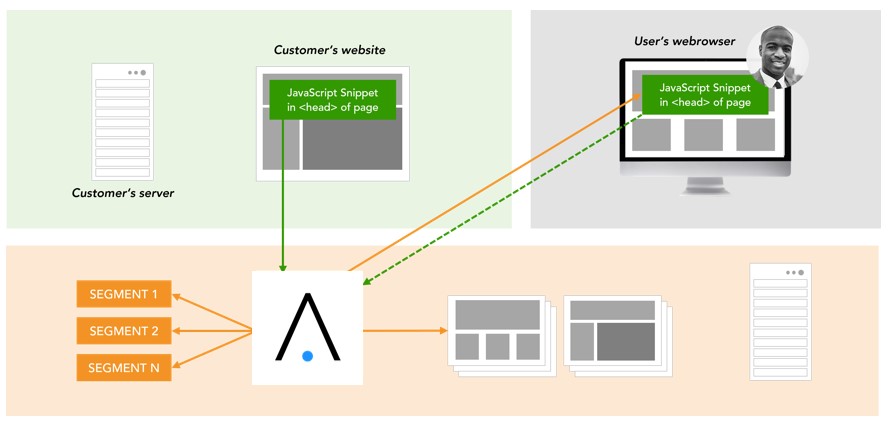
Hosting of Content
The content of the new page variants (graphics, texts, buttons, etc.) can be integrated into Adtelligence CX or be located entirely on the customer server. For example, existing graphics or content can be referenced via HTML in order to display them on the new page variants. If completely new graphics or content are to be used, they can be uploaded to the Adtelligence CX server or also stored on the customer servers and referenced in the page variants.
4. Serversided CMS integration of Customer Experience Management Software
For server-side integration into a CMS, the Adtelligence system offers individual APIs to perform the necessary actions within the setup. Thus, the system can be integrated directly into your CMS. To ensure the highest data protection standards, the storage and management of content (images, texts, page elements) can thus remain entirely within the customer’s CMS. The Adtelligence platform then acts as the brain that controls the playout: it takes over the decision as to which elements are played out on the page and only transmits anonymized content IDs to the CMS. No content is loaded from the Adtelligence platform.
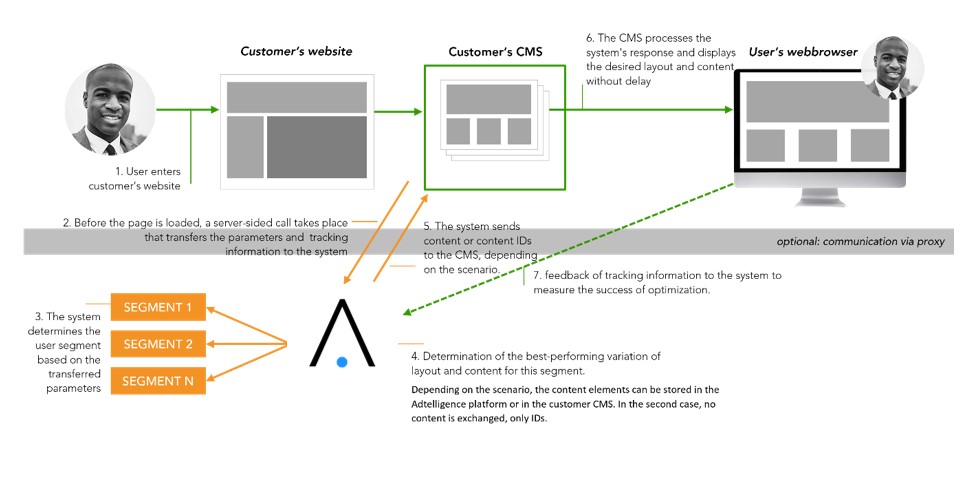
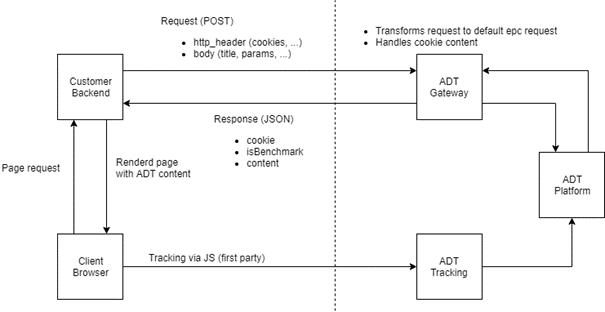
- A user enters the web page.
- Before the page is loaded, a server-side call from the CMS to the Adtelligence API takes place, which transmits the data parameters and tracking information to the Adtelligence system.
- The system determines the visitor segment based on the transmitted parameters. It selects the content to be displayed for this user. However, these contents are not located in the Adtelligence platform, but within the CMS. Thus, the Adtelligence system only knows the respective content ID.
- The system sends the content IDs to the CMS. The CMS processes the system’s response and displays the desired layout and content without delay.
- The visitor sees the selected variant immediately in his browser.
- When jointly defined goals are reached (e.g., clicking on a button, reaching the order confirmation page, etc.), the successful action is reported to CX via a tracking call to measure which variations lead to the goal for which target groups. Here, an anonymous ID of the achieved goal is transmitted, which does not contain any personal data.
Example: technical process diagram
In the following, an option of the data flow is presented. The final setup is always subject to the specifications of the customer CMS, customer IT or defined business processes that must be adhered to (e.g.: Proxy necessary yes/no?).
4.2 Hosting
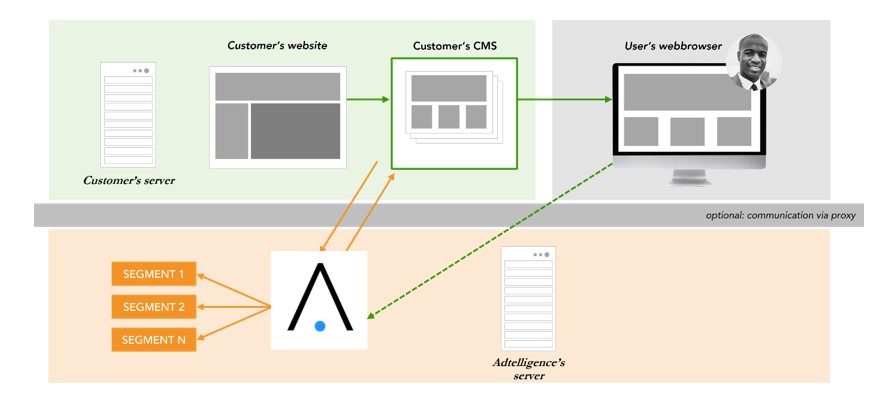
Hosting Schema
Content Hosting
The content of the new page variants (graphics, texts, buttons, entire web page variants, etc.) usually takes place entirely in the customer’s CMS during CMS integration. There is no content within the Adtelligence platform, only the IDs of the respective content elements are mapped.
5. Optional: Integration of a proxy server
Depending on IT/business requirements, a proxy server can be integrated as an intermediate point of communication. A proxy server ensures that there is no direct communication between the website and the Adtelligence system.
The proxy is usually provided by the client to ensure sovereignty over data communication. On request, a proxy server can also be provided by Adtelligence.
It takes over selected tasks within the data communication. Examples: Anonymization of the IP address, integration of selected business logic, connection of specific APIs.
Data flow schema
Two calls run through the proxy: delivery and tracking.
Implementation:
- Endpoints are individually configured in the integration code, e.g. calls are not routed directly to customer-service.adtelligence.com, but to the proxy, e.g. customer.com/adt-delivery/ and customer.com/adt-tracking/ (URLs can be selected individually).
- Customer configures proxy web server, so that depending on the type of call (delivery/tracking) the corresponding endpoint is addressed
- Proxy functionality is provided by the customer in the proxy, e.g. anonymization of IP address
- Functionally customized call is executed to customer-service.adtelligence.de/.
Examples:
Delivery Endpoint: GET https://customer-service.adtelligence.de/convertplus-web-rest/rest/epc/delivery/…
Tracking Endpoint: POST https://customer-tracking.adtelligence.de/piwik.php?…
Dependency: all browser headers must remain unchanged for functional delivery and tracking.