This is a technical documentation of a server-side delivery where the customer displays its own content while the ADTELLIGENCE product provides only variation selection and tracking.
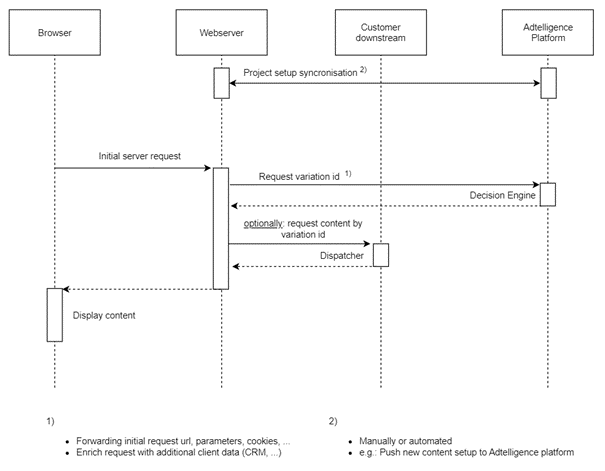
Delivery Endpoint
GET https://{customer}-service.adtelligence.de/convertplus-web-rest/rest/content/objects/{companyId}/{pageId}
This endpoint returns a variation for a project matching the query parameters in the request. Response format is json.
Hint: URLs from where the endpoint is requested must be configured in the Adtelligence administration panel. Unknown URLs are not allowed for request.
Request Parameters
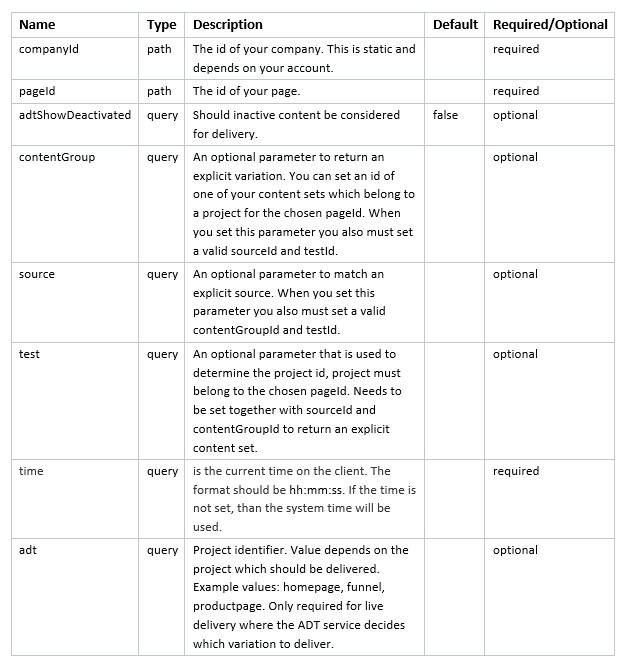
Additional Parameters
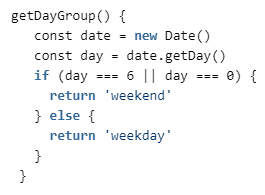
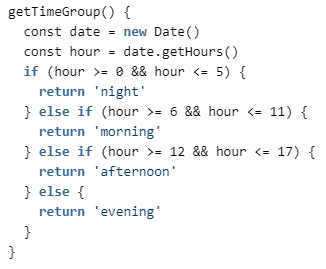
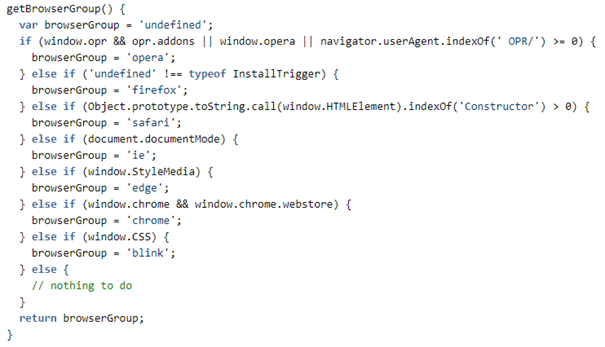
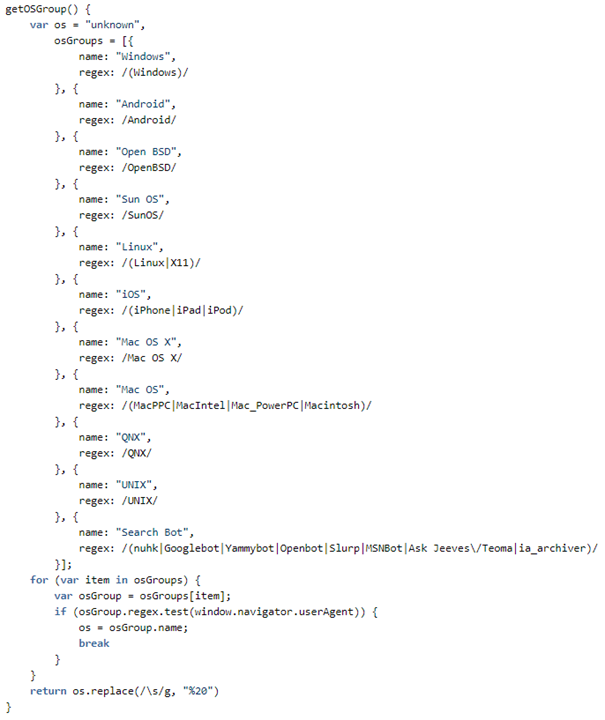
These parameters should be appended to the Delivery Endpoint for further insights and optimization potential. See attachments for code examples.
- _adt_device – accepted values are ‘smartphone’, ‘tablet’, ‘desktop’ or ‘other’. Append empty to use ADT Device Detection (only with user-agent headers): ‘_adt_device=’
- _adt_day – should be based on client time
- _adt_time – should be based on client time
- browserGroup – in case of serverside integration the browserGroup should be detected via a library like matomo device detector
- os – in case of serverside integration the os should be detected via a library like matomo device detector
- TIME_OF_DAY – clienttime
- TIME_ZONE_OFFSET – clienttime
- DAY_OF_WEEK – clienttime
Example Delivery Request
The request should be made transparently. All request headers from the client should be attached like cookies and user-agent.
GET https://demo-service.adtelligence.de/convertplus-web-rest/rest/content/objects/71/153?time=11:11:11&id=integrationtest&_adt_device=&_adt_day=weekday&_adt_time=afternoon&browserGroup=chrome&os=Windows&TIME_OF_DAY=11&TIME_ZONE_OFFSET=-60&DAY_OF_WEEK=Wednesday
Example Forced Delivery Request
This call is useful for caching purposes in case we don’t want the system to decide which variation to deliver but rather force the system to deliver a specific variation.
GET https://demo-service.adtelligence.de/convertplus-web-rest/rest/content/objects/71/153?time=11:11:11&test=1005&source=163&contentGroup=4752
In case a variation should be delivered which is currently deactivated (for testing purposes) also attach this parameter:
· adtShowDeactivated=true
Example Delivery Response
The content of this response is important for tracking and content rendering.
Content-Type: application/json
Active Project Response
Shown is one of the 3 possible responses for the above request (since there are 3 variations):
{“piwikSiteId”:141,”test”:1005,”source”:163,”contentGroup”:4752,”benchmark”:false,”equallyDistributed”:true,”layout”:691,”contentObject”:[],”optOut”:false,”deliveryLifeTimeMinutes”:30,”deliveryInformation”:{“queryParameters”:[{“parameter”:{“type”:”QUERY_PARAMETER”,”key”:”time”},”value”:”11:11:11″},{“parameter”:{“type”:”QUERY_PARAMETER”,”key”:”id”},”value”:”integrationtest”},{“parameter”:{“type”:”QUERY_PARAMETER”,”key”:”_adt_device”},”value”:””},{“parameter”:{“type”:”QUERY_PARAMETER”,”key”:”_adt_day”},”value”:”weekday”},{“parameter”:{“type”:”QUERY_PARAMETER”,”key”:”_adt_time”},”value”:”afternoon”},{“parameter”:{“type”:”QUERY_PARAMETER”,”key”:”browserGroup”},”value”:”chrome”},{“parameter”:{“type”:”QUERY_PARAMETER”,”key”:”os”},”value”:”Windows”},{“parameter”:{“type”:”QUERY_PARAMETER”,”key”:”TIME_OF_DAY”},”value”:”11″},{“parameter”:{“type”:”QUERY_PARAMETER”,”key”:”TIME_ZONE_OFFSET”},”value”:”-60″},{“parameter”:{“type”:”QUERY_PARAMETER”,”key”:”DAY_OF_WEEK”},”value”:”Wednesday”}],”debugInformation”:null}}
- piwikSiteId -> (int) Tracking Id used to connect Matomo Tracker
- test -> (int) Test Id
- source -> (int) Source Id
- contentGroup -> (int) ContentGroup Id
- benchmark -> (bool) Whether delivered variation is benchmark or not
- equallyDistributed -> (bool) Whether traffic is getting optimized
- layout -> (int) Layout Id
- contentObject -> (array) Would contain variation content (html, css, js)
- optOut -> (bool) Whether the user opted out from Adtelligence
- deliveryLifeTimeMinutes -> (int) Lifetime in minutes for delivered variation
- deliveryInformation -> (array) Contains parameter from the request and more
Inactive Project Response
{“errorCode”:”ADT-CORE-000031″,”message”:”Entity deactivated: Project ID 1005 is paused or hidden.”,”payload”:null}
Invalid CompanyId Response
{“errorCode”:”ADT-CORE-000017″,”message”:”Illegal access. Cause of error: Company 1 has no access rights to the requested object.”,”payload”:null}
Invalid ContentGroup Response
{“errorCode”:”ADT-CORE-000016″,”message”:”Entity not found: Variation with ID 1 was not found.”,”payload”:null}
Invalid Source Response
{“errorCode”:”ADT-CORE-000016″,”message”:”Entity not found: Data source with ID 1 was not found.”,”payload”:null}
Variation Mapping
The information which variation to render from the CMS is coming from the delivery response via:
- test
- source
- contentGroup
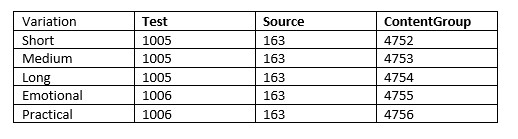
All 3 values identify a very specific variation. A contentGroup could be part of multiple projects (=tests) which is why the combination of those parameters must be considered.
These values need to be matched with the setup configured in the admin interface by Adtelligence.
If there would be 3 landing page variations:
- Short
- Medium
- Long
And 2 funnel variations:
- Emotional
- Practical
There could be a matching in the admin interface like this:
Variation Caching
After a user sees a variation, he should see the same one for the length of the current delivery session defined by “deliveryLifeTimeMinutes”. During this time the delivery should be forced. This only applies per project (test). You can have multiple projects in the same user visit. Each has its own deliveryLifetimeMinutes and a variation that needs to be persistent during this time.
This is configurable in the admin interface per project (i.e., a homepage can have a persistent delivery for 7 days and a confirmation page only of 30 min, depending on what the current use case is).
This means that a server-side integration must react upon the “deliveryLifeTimeMinutes” value in the delivery response and persist the “source”, “contentGroup” and “test” for the duration of “deliveryLifeTimeMinutes” minutes for a given project.
Even if we already know which variation will be delivered there should still be a forced delivery call. This is needed to verify if a project has been deactivated in the meantime or if a user has set the adtelligence opt out cookie.
Caching concept – cache response for the same request
This is a concept where there can be a fresh delivery call when the request has changed. For example the user comes with a specific campaign ID and gets a variation delivered.
In the same visit the user comes with another campaign ID there might be a use case where the user should receive a freshly delivered variation.
The idea is basically that its totally up to the usecase when there should be a fresh or a forced delivery call.
Variation Rendering with Sulu and Twig
(Disclaimer: This part is partially based on theoretical knowledge, more details to be discussed with Sulu)
Sulu is taking care of the content within the variations.
Twig is the render engine where content and layout meet.
The variation information delivered by Adtelligence should be used by Twig to decide which layout to render in combination with the content from Sulu.
The rendering will therefore be totally dynamic based on the delivery of Adtelligence.
Tracking
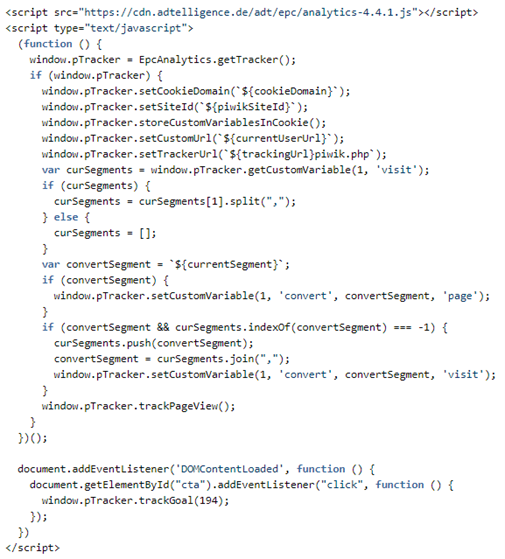
The following JavaScript snippet must be included in all pages where delivery and/or tracking occurs. This example uses the JS templating syntax.
This snippet is subject to updates. Update of the core system requires most of the time an update of the tracking component which will lead to an update of the snippet code.
The code requires the ADT tracking library and instantiates a Matomo tracker.
The Tracker is configured via the parameter definitions.
The convertSegment is used to assign upcoming page views to the delivered variation.
Ideally this snippet can be rendered with Twig to use the information from the delivery as variables.
Parameter Definitions
- trackingUrl – “https://demo-tracking.adtelligence.de/”
- currentSegment – This should be a string built from the delivery response and requires to look like this: `[{layout}:{source}:{test}:{contentGroup}]`
- cookieDomain – *.customer-name.de
- currentUserUrl – This should include the queryParameters from the delivery response
- piwikSiteId – This should be the piwikSiteId from the delivery response
Optionally via Proxy
In case the tracking calls should not be going directly to adtelligence.de via the client, the trackingUrl can be defined as a proxy url. The proxy itself should transparently forward all headers, cookies and parameters to „https://demo-tracking.adtelligence.de/“ (like with the delivery call).
Example: The client requests „forward.customer-name.de“ with all queryParameters from the delivery response.
The proxy would need to be installed on forward.customer-name.de or any other subdomain.
Attachments
_adt_day