Standardized Integration Options
Adtelligence Software Integration – Overview
The Adtelligence Personalization Engine software automatically analyzes the information of each website visitor in order to dynamically display website variants optimized for this visitor in real time and thus increase conversion rates. To do this, it is integrated once into your CoreMedia website and then runs seamlessly and fully automatically.
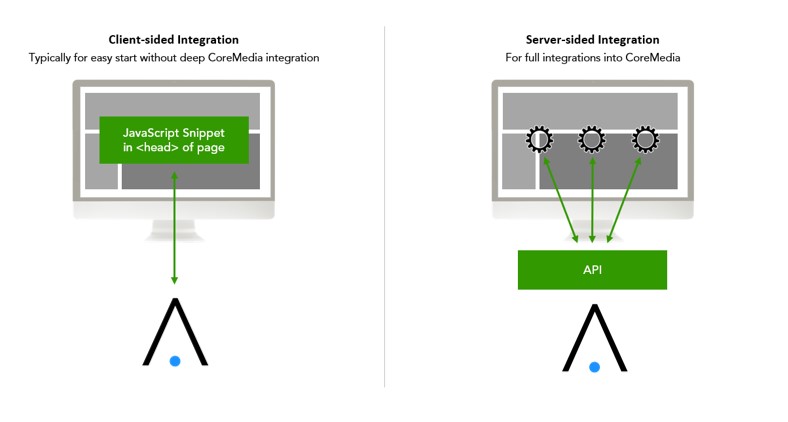
Two types of integration are available for integration into a CoreMedia CMS: client-side JavaScript integration and server-side full integration. These are explained later in this document.
The details of CoreMedia integration depend on the customer’s setup and business case and can be specifically adapted to your needs at any time.
Further details can be found in section CMS integration.
Optional Integration Scenarios for Coremedia CMS Integration (depending on it-/business needs)
Depending on IT/business requirements, integration with CoreMedia CMS can be flexibly implemented.
From a purely client-side integration via JavaScript snippet to server-side CMS integration with/without proxy, different integration scenarios can be implemented. To determine the best integration type for you, the following questions are relevant:
Content creation: Who develops the content of the personalized variants?
- Content is developed by Adtelligence
- Content is developed by customers themselves
Content management: Where is the content of the personalized variants hosted?
- Content is hosted and delivered by Adtelligence
- Content is developed by Adtelligence and provided in a VCS (Version Control System, e.g., git repository), from there it is played out by the CMS.
- Content is hosted and delivered in the CMS
Are there any technical requirements that are not provided by the CoreMedia CMS
(e.g., connecting specific external APIs, uploading content to an SFTP…)
- Yes: a proxy can be used as a gateway providing individual business logic
- No: a proxy is not necessary
Optional Components for CoremediaCMS Integraation (depending on IT Requirements)
Content Management
1. In CoreMedia CMS
- Benefit: Customer can manage content in their CMS
- Impact: New content elements that do not exist today and are to be integrated into the personalized variants and, if necessary, only tested, must be programmed and provided by the customer’s IT department. All content elements provided by the CMS must be mapped in both systems (IDs of the individual content elements or entire layouts are synchronized).
2. In the Adtelligence System
- Advantage: Flexibility! Adtelligence can flexibly add new layouts, content elements or functional/interactive elements to the site without these having to be programmed and provided in advance by the customer’s IT department.
- Impact: Layout/content is agreed in advance between the customer and Adtelligence and approved by the customer.
Optional Components for the Coremedia CMS Integration (depending on it specifications)
Content Control
1. The CoreMedia CMS provides the benchmark page, the adaptation of the page is done by the integrated Adtelligence Script.
- Advantage: flexible presentation options of new, personalized variants.
- Impact: Adtelligence system controls the selection of elements and presentation of pages
2. In CoreMedia, control elements are implemented that allow editors to have individual page elements dynamically filled by Adtelligence.
- Example: In CoreMedia, a dropdown is implemented to select a) no Adtelligence manipulation, b) display of one element by Adtelligence, or c) display of the entire page variant by Adtelligence.
- Advantage: full control of all individual page elements by the client
- Impact: Control elements and communication with the Adtelligence system must be programmed and provided in CoreMedia. All content elements provided must be mapped in both systems (IDs of individual content elements or entire layouts are synchronized).
Proxy Server
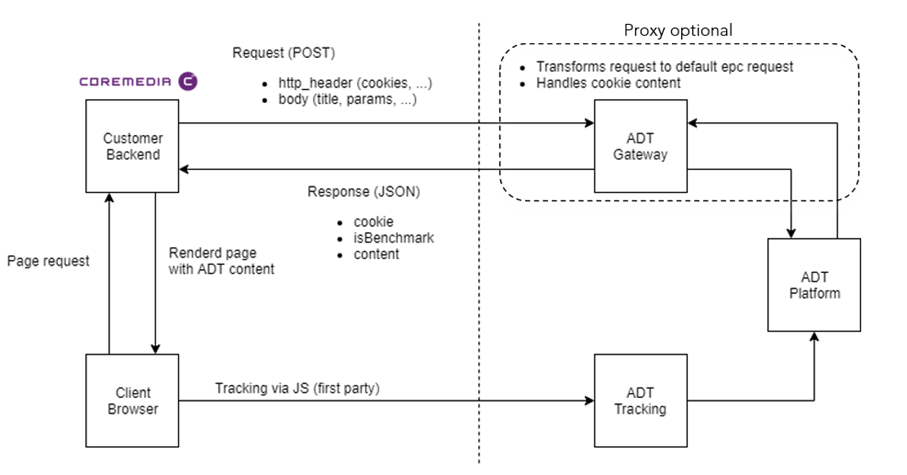
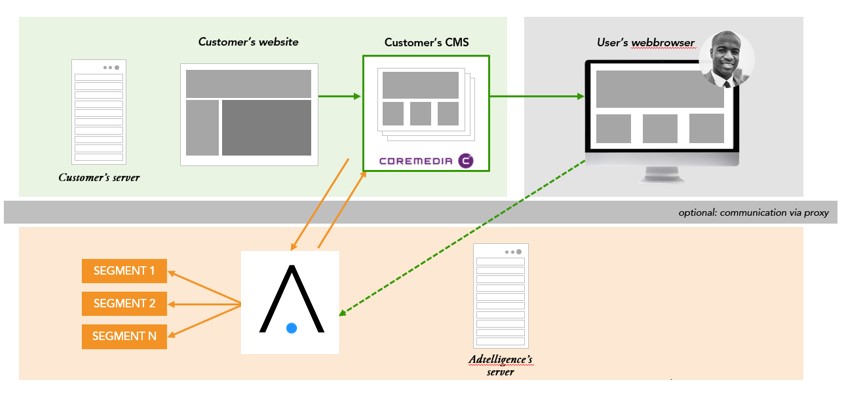
- If desired, a proxy can be used for communication between CoreMedia CMS and Adtelligence Platform.
- Communication between the two systems can be controlled and filtered in a targeted manner via the proxy.
Adtelligence JavaScript Integration
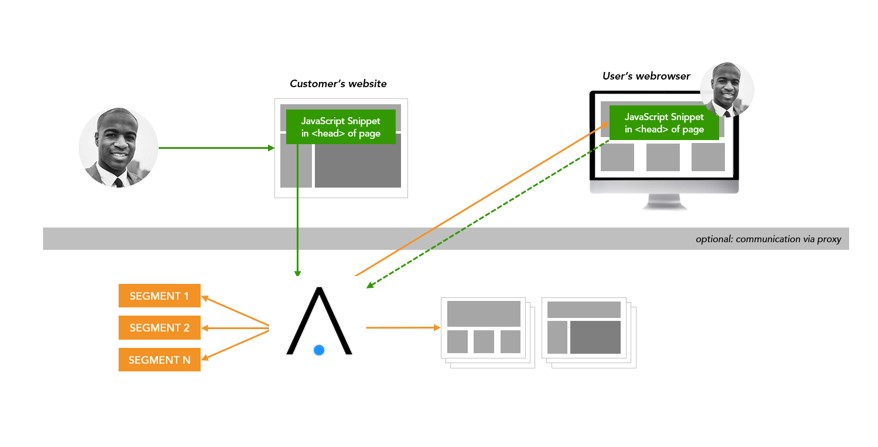
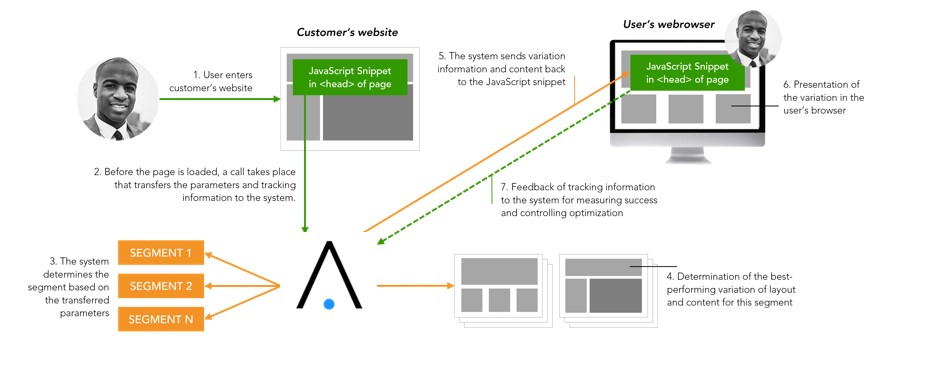
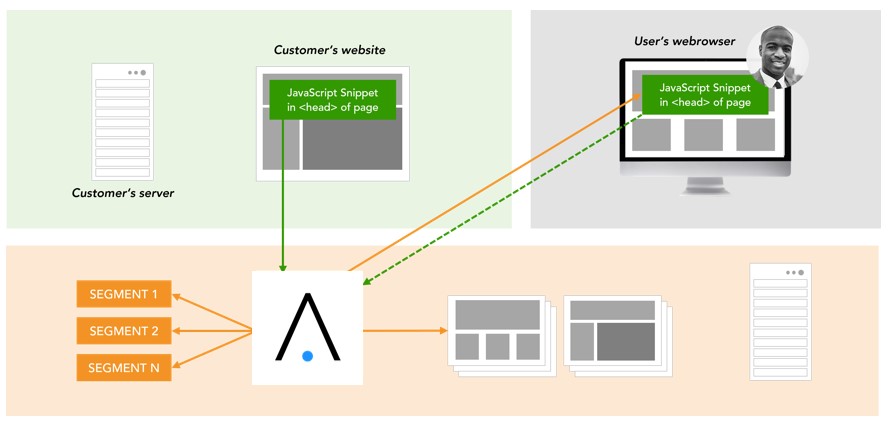
- The integration of Adtelligence Personalization Engine on a website using JavaScript enables the simple creation of variants of existing web pages as well as the tracking of visitor actions, without a deeper integration into the CMS.
- Adtelligence provides the JavaScript snippet, which is integrated via copy&paste into the <head> area of all web pages on which variants are to be shown or a pageload or success is to be tracked.
- Essential for the correct functioning of the technology is the integration of the snippet in the <head> of those pages on which content is shown
- Further detailed information can be found in section JavaScript integration
Adtelligence JavaScript Integration – Schema
Adtelligence JavaScript Integration – Data Flow
Adtelligence JavaScript Integration – Hosting
Adtelligence Coremedia CMS Integration
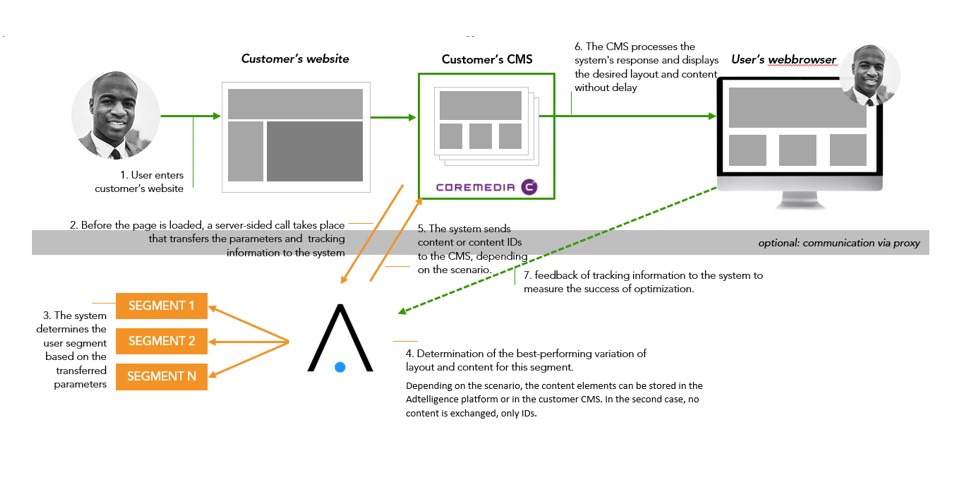
For server-side integration into CoreMedia, the Adtelligence system offers individual APIs to perform the necessary actions within the setup. This allows the system to be integrated directly into your CoreMedia CMS.
To ensure the highest data protection standards, the storage and management of content (images, texts, page elements) can thus remain entirely within the customer’s CoreMedia CMS.
The Adtelligence platform then decides which elements are displayed on the page and only transmits anonymized content IDs.
Server-sided CMS Interation – Schema
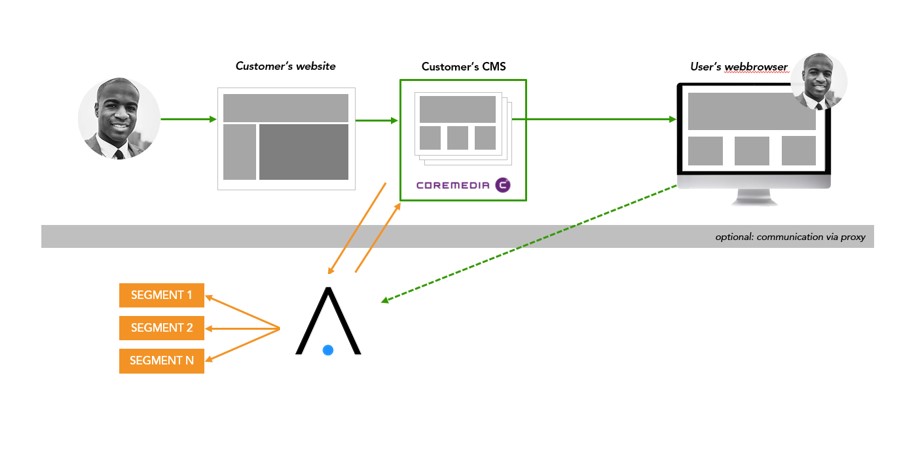
Server-sided CMS Integration – Data Flow
Server-sided CMS Integration – Hosting
Coremedia CMS Integration Example Technical Process Diagram