1 Introduction
Thank you for choosing the Customer Data and Transaction Platform.
The Acceleraid Customer Data Platform (CDP) is a cutting-edge solution designed to consolidate your web, CRM, and existing customer data into a unified, flexible platform. By leveraging advanced AI and machine learning technologies, this platform offers an end-to-end solution for capturing, storing, categorizing, and synchronizing data from various sources such as CRM systems, email service providers (ESP), data management platforms (DMP), APIs, and point of sale (POS) systems.
1.1 Key Features and Benefits:
- Elimination of Data Silos: Acceleraid integrates all data sources into a single, intelligent database, providing a 360° view of customer data. This integration ensures that information is no longer isolated within different departments, facilitating seamless information exchange and collaboration across your organization.
- Automatic Data Cleaning and Preparation: The platform automatically cleans and prepares data during the import process, ensuring high-quality and actionable data. This includes the normalization of complex and cryptic merchant names from credit card transactions, making the data more usable for automated campaigns and analysis.
- Advanced Data Categorization and Enrichment: By using AI, Acceleraid categorizes and enriches your data, enabling deeper insights into customer behavior. For example, it can categorize transactions into broader, more useful categories and add psychological factors to improve marketing precision.
- Flexibility and Real-Time Data Processing: The platform supports real-time data processing, ensuring that all models are updated with the latest data. This flexibility allows for immediate adjustments and optimizations in your marketing and sales strategies.
- Comprehensive Data Protection and Compliance: Acceleraid adheres to stringent data protection regulations, ensuring your data is secure and compliant with GDPR. Data is pseudo-anonymized or fully anonymized before processing, maintaining the highest standards of privacy and security.
- AI-Driven Customer Segmentation: The platform includes predictive segments powered by AI, which analyze customer data in real-time to generate actionable insights. This helps in creating highly targeted marketing campaigns and improving customer engagement and conversion rates
Acceleraid’s Customer Data Platform not only simplifies the management of vast amounts of data but also empowers businesses with the tools needed for advanced data analysis and personalized customer targeting. By integrating seamlessly into your existing IT infrastructure, it enhances your ability to make data-driven decisions and drive revenue growth.
For more detailed information and to see the platform in action, you can visit the Acceleraid website.
In this document you will find a detailed step-by-step guide using the example of a customer who wants to personalize, automate and optimize his marketing campaigns for existing customers. Start personalizing now, increase average monthly revenue of your customers, increase App usage and generate more cross-sells.
2 How does the software fit into my existing IT stack?
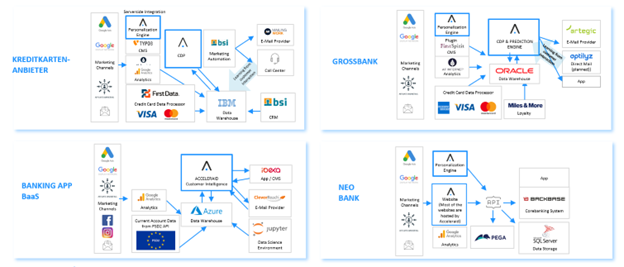
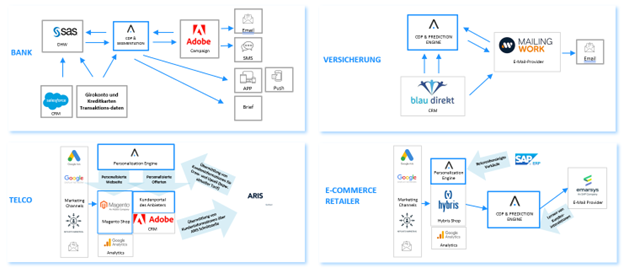
Acceleraid boasts over a decade of experience seamlessly integrating into various IT stacks, ensuring efficient and effective solutions for their clients. Specializing in personalization engines, Acceleraid often deploys these engines on top of a CMS system or directly within the CMS, providing tailored user experiences. Their expertise extends to Customer Data Platforms (CDP), typically positioned between the client’s data warehouse and existing marketing automation tools. This strategic placement allows Acceleraid to optimize data flow and enhance marketing automation capabilities, bridging the gap between the data warehouse and marketing channels. By leveraging the platform, clients benefit from advanced marketing automation, improving customer engagement and operational efficiency.
2.1 How is the software provided?
The software is made available via the internet as a cloud solution; alternatively, an on-premise installation can also be implemented on request. However, this does not require any personal data to be transferred to the cloud. We have developed a special pseudonymization procedure for this purpose, which is explained later in this document.
2.2 What would be a typical data flow?
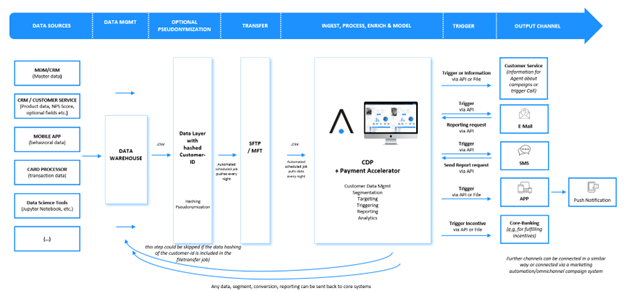
In today’s digital landscape, managing and leveraging data effectively is crucial for any organization’s success. Acceleraid’s Customer Data Platform (CDP) provides a robust framework for ingesting, processing, and utilizing data to drive targeted marketing efforts and enhance customer engagement. This guide will walk you through the traditional data flow within the Acceleraid CDP, illustrating how data sources, management processes, and output channels integrate seamlessly to create a powerful data-driven ecosystem.
Traditional Data Flow with Acceleraid CDP
- Data Sources:
- The journey begins with various data sources, including Master Data Management (MDM) systems, CRM and customer service platforms, mobile apps, card processors, and data science tools such as Jupyter Notebooks. These sources provide comprehensive data sets encompassing master data, product data, behavioral data, transaction data, and more.
- Data Management:
- Collected data flows into a centralized data warehouse where it undergoes initial consolidation and organization. This step ensures that all incoming data is accurately stored and readily accessible for further processing.
- Optional Pseudonymization:
- For enhanced data security and privacy, a data layer with hashed Customer-IDs can be introduced. This layer ensures that personal identifiers are pseudonymized on Acceleraid side, maintaining user privacy while still allowing for effective data analysis and segmentation.
- Transfer:
- The processed data is transferred using secure methods such as SFTP or MFT. These automated scheduled jobs pull data at regular intervals, ensuring that the CDP has up-to-date information for accurate analysis and decision-making. From sending real-time data via an API to sending daily data updates everything is feasible. Customer could send the whole customer data base each day or only the data which is updated daily, depending on customers preferences.
- Ingest, Process, Enrich & Model:
- Within the CDP, data is further ingested, processed, and enriched. This phase involves sophisticated data management, segmentation, targeting, triggering, reporting, and analytics. The CDP acts as the brain of the operation, transforming raw data into actionable insights.
- Trigger:
- Based on the processed data, various triggers are activated. These triggers can generate customer service notifications, report requests, or marketing incentives. The system can send triggers via API or file, depending on the integration setup.
- Output Channels:
- Finally, the actionable insights and triggers are directed to appropriate output channels, such as customer service teams, email, SMS, mobile apps, and core banking systems for fulfilling incentives. This ensures that the right message reaches the right customer at the right time, enhancing the overall customer experience.
By following this structured data flow, organizations can harness the full potential of their data, driving more personalized and effective marketing strategies with Acceleraid’s CDP. This guide will delve deeper into each step, providing detailed instructions and best practices for optimizing your data integration and management processes.
3 How does the data get into the software?
The most common way is a CSV data export from the BI system, the CRM or e.g. from the credit card processor. A daily extract with the necessary data should be exported fully automatically; alternatively, manual data extracts can also be defined and provided. If your system does not have a corresponding built-in export function, we will be happy to support you with automation. However, we can of course also integrate other interfaces. The transfer to the Acceleraid platform is encrypted via SFTP (Secure File Transfer Protocol). Alternatively, other interfaces (e.g. cloud shares) can also be used for integration.
4 Which data do I need to leverage the full potential of the Acceleraid CDP?
To maximize the benefits of the Acceleraid Customer Data Platform (CDP), it’s crucial to import the right data. Here’s what you need:
- Customer Data Master: Comprehensive customer profiles including personal and contact information.
- Customer Product Data for Credit Cards: Details about the credit card products owned by customers, such as product type and contract date.
- Credit Card Transaction Data: Transaction data from card processors, including authorization feeds.
- Giro Account Transaction Data (Optional): Transaction details from current accounts, useful for broader financial insights.
- Customer Product Data for Other Products: Information about additional products owned by the customer.
- Connection to Newsletter Providers: Data for managing outgoing and incoming communications with newsletter services.
By ensuring you have these data types, you can fully utilize Acceleraid CDP’s capabilities in segmentation, targeting, and personalized marketing strategies.
For more detailed information about which data parameters are mandatory and which are optional, visit the Acceleraid Knowledge Base – Data Description or ask for the Acceleraid Data Catalogue.
5 How does the pseudonymization of data work?
The Acceleraid software can work with personal data or an anonymous identifier and does not require any personal data or customer data, credit card or account numbers for the software to work. The data can be masked in advance on the customer side before data is transferred to Acceleraid.
If the customer is unable to provide pseudonymization, the data splitter developed by Acceleraid can be used:
A data splitter is interposed in the export for this purpose, which pseudonymizes and filters the data. The data flow is illustrated in the following graphic. Acceleraid never has access to the personal data, but can still trigger the appropriate action, e.g. an email from an external connected email system. The data splitter separates the personal and contact information relevant to the communication channels from the rest of the data record. From the remaining data, the fields that are required for a suitable customer group selection are selected and transferred to Acceleraid. Data fields that are neither relevant for output channels nor for decision-making, such as customer, credit card or account numbers, are discarded by the data splitter if they exist. For subsequent assignment in the communication, an identifier is attached to each of the two data records, which cannot be traced back to a person without the data of the communication channel.
Example of the pseudonymization process – email marketing channel
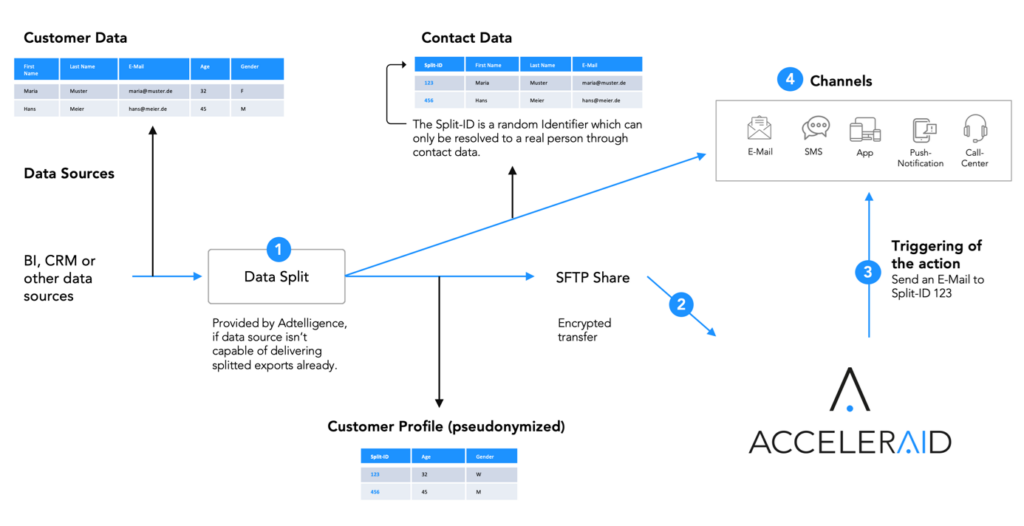
- separation of the customer profile from personal data
- transfer of customer data without personal identification to Adtelligence
- Acceleraid delivers action & recipient (e-mail campaign and customer ID) to e-mail system
- email system reconnects ID to name and email address etc. to send personalized campaigns
Note: The output channel either needs the matching from pseudonymized Identifiers to real name and contact information of the customer who should get communication or contact information and non-pseudonymized data could be integrated and used to trigger communication directly.
6 First steps – How do I create an account?
6.1 Receive login data
Please inform your ACCELERAID contact person of the surname, first name and e-mail address of all persons who require access to the system. Your contact person at ACCELERAID will then set up the necessary accounts for you.
6.2 Activate and manage account
- As soon as your account has been created, you will receive an e-mail containing a confirmation link.
- Please click on this link to verify your e-mail address and create your password. Please note that the link is only active for 24 hours. If you wish to complete the verification process at a later time, please contact your ACCELERAID contact person to have your account reactivated.
- To add new accounts, make changes to existing accounts or delete them, please also contact your ACCELERAID contact person.
6.3 Forgot password
- If you have forgotten your password, simply visit the ACCELERAID login portal, which you can always find at https://CUSTOMERNAME-dashboard.adtelligence.de. Click on “Forgot Password?” there.
- In the next step, enter your username. This is usually a combination of the first letter of your first name and your surname, for example: Hans Mustermann –> hmustermann.
- After you have clicked on “Submit”, you will receive an e-mail with a link that you can use to reset your password.
6.4 Login
- Visit the ACCELERAID login portal, which you can always access at https:// CUSTOMERNAME-dashboard.adtelligence.de.
- Use your username and password to log in to the software.
6.5 First steps in the software
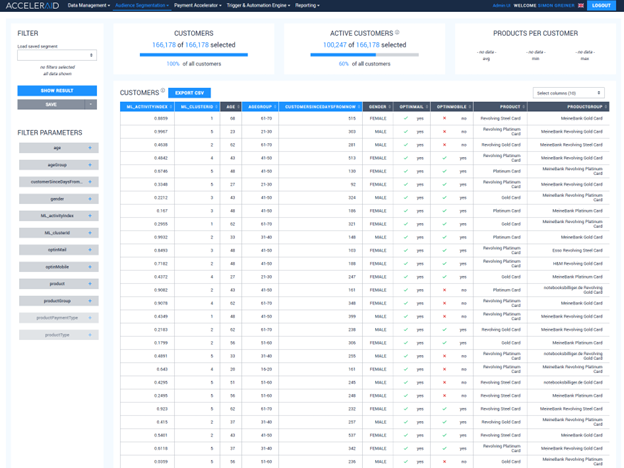
Once you have successfully logged in, you will be redirected to the start page of the software. This start page provides a comprehensive overview of all your customers.
At the top of the window, you will find the main menu. Use this menu to navigate within the software and access all available tools. Here’s a guide to the main menu options:
- Data Management:
- View standard statistics about the integrated data.
- Assess the quality of your data.
- Audience Segmentation:
- Access the Customer Overview, which is your start screen.
- Manage all saved segments.
- Payment Accelerator:
- View specific features for the extension package for credit card data.
- Analyze standard statistics about customer behavior.
- Use the Persona Dashboard.
- Conduct Merchant-Category correlation analysis.
- Evaluate Merchant Performance.
- Trigger & Automation Engine:
- Utilize the Trigger Engine to automate your marketing campaigns.
- Configure your campaign tags.
- Reporting:
- Generate a variety of reports, including:
- Campaign Overview Report
- Campaign Performance Overview
- Campaign Details Report
- Revenue Report Overview
- Campaign Impact Report
- Campaign Impact Overview Report
- Generate a variety of reports, including:
Use these menu options to efficiently manage and analyze your customer data, automate your marketing efforts, and generate detailed reports to assess your campaigns’ performance.
For detailed information on how your software works, please visit your user manual, which you can find at the link provided. If you have any further questions, your ACCELERAID contact person will be happy to help you at any time.
7 Data Integration and Optimization at Acceleraid
Upon receiving your data, Acceleraid integrates it into a standardized data model designed to enhance AI capabilities and campaign automation. Our process ensures that your data is clean, consistent, and ready for sophisticated analysis and marketing efforts.
7.1 Credit Card Transaction Data Cleaning
- Merchant Name Standardization: We begin by normalizing merchant names. For instance, variations such as “AMAZON,” “PAYPAL * AMAZON,” and “AMZN” are consolidated into a single entity, “Amazon.” This standardization process is automated for each data import, ensuring consistency across all transactions.
7.2 Advanced Categorization
- Simplified Transaction Categories: Visa and Mastercard classify transactions into over 1,000 categories, which are too granular for effective marketing and sales strategies. To address this, we reclassify these transactions into 51 broader categories.
- Psychological Factors: Each category is enriched with psychological insights. For example, the “Kids” category indicates a high likelihood of customers having children based on their transaction patterns.
7.3 Model Development
- Categorization Model: Our categorization model leverages merchant names and Merchant Category Codes (MCCs) to accurately classify transactions. This model ensures that your data is not only cleaned and standardized but also enriched with valuable insights for targeted marketing.
Through these meticulous processes, Acceleraid transforms raw data into a powerful asset, ready to drive AI-powered campaigns and marketing automation with precision and sophistication
8 Automating Your First Campaign on the Acceleraid Platform
Once everything is set up and data integration is occurring regularly, you can begin automating your first campaign. Follow these steps to get started:
8.1 Navigate to the Trigger Engine:
- Go to the “Trigger & Automation Engine” section.
- Click on “Trigger Engine”.
8.2 Understanding Campaign Sets and Campaigns:
- Campaigns: These are individual entities that automate specific processes, such as sending a welcome email to a new customer.
- Campaign Sets: These are overarching entities that group multiple campaigns. To activate any campaign, you must set the overarching campaign set live.
8.3 Creating a New Campaign Set:
- For a new system, you need to create a new campaign set.
- Example Campaign: Target credit card customers who have been customers for 10 to 20 days but have not made any transactions yet.
8.4 Enabling Edit Mode:
- Click on “Enable Edit Mode” in the upper left corner.
- Select “Create New” to create a new campaign.
8.5 Defining the Audience:
- Choose customers who have been with you for 10 to 20 days, have no transactions in the last 20 days, and have an email option.
- You can save pre-conditions such as email opt-ins and blacklist statuses in the Customer Overview as a segment for reuse in future campaigns.
- Define the audience by clicking on “Add Parameter” and selecting the appropriate parameters in the popup.
8.6 Setting Blocking Criteria:
- Typically, you will block the current campaign to ensure each user receives it only once.
- You have complete flexibility to set other blocking criteria as needed.
8.7 Defining Campaign Goals:
- Specify what counts as a conversion, which is the goal the AI algorithm will optimize for.
- Unlike standard email tools, you have the flexibility to define goals based on all your data. For instance, a conversion might be counted if a user makes at least one transaction in the category airline or 10 transactions in supermarket.
8.8 Selecting the Output Channel and communication:
- Choose the email or email variants to be included in this campaign.
- They are synced with your email tool so you can create the templates there and select them in the Acceleraid Platform
By following these steps, you can efficiently set up and automate your first campaign on the Acceleraid platform, leveraging its advanced capabilities for precise targeting and optimization. For more details look at our User Manual.
9 Enhancing Campaign Performance with AI Optimization
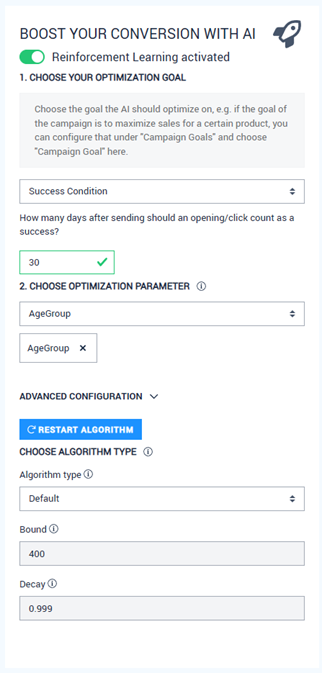
When you add multiple variations of an email to a campaign, the system will distribute them equally among customers at random. To boost the conversion rate using AI, follow these steps:
9.1 Activate Reinforcement Learning:
- Click the red button in the upper right corner of each campaign.
- Enable Reinforcement Learning.
9.2 Configure Optimization Goals:
- Define the goal for the algorithm to optimize, such as conversions or specific user actions.
- The algorithm will then prioritize and send out the email variant that performs the best.
9.3 Advanced Optimization with Context:
- For more sophisticated optimization, you can add context, such as age groups.
- The system will identify the best-performing variant for each specified group (e.g., 21-30 year-olds and 51-60 year-olds) and distribute emails accordingly.
By leveraging these AI-driven features, you can enhance your campaign’s effectiveness, ensuring that each target audience receives the most relevant and high-performing email variations.
For more details look at our User Manual.